Before Vacation Mode, the only way to stop cards arriving while you were away was to delete your want list and rebuild it when you got home. Funnylarri asked for something better before a trip, and that request became this feature. Vacation Mode pauses everything new that comes in to you, leaves your lists exactly as they are, and switches itself off when you get back.

When to use it
The obvious case is travel. If you're going to be away from your mailbox for two weeks, you don't want a stack of packages waiting that need confirming, or senders wondering why their trade hasn't been marked received.
It's also useful when you're building or reworking a want list. Say you're putting together a new cube and adding 200 cards over an evening. Without Vacation Mode, the first card you add is live, and someone can send it before you've decided you'd rather have the foil, or a different printing, or not that card at all. Turn it on, build the list the way you want it, check your finish and language settings, then turn it off and let it go live all at once.
And it works for saving points. Vacation Mode only stops things coming in. You can still send cards from Send Cards and make your own trade offers, so if you want to build up your balance for a big pickup later, you can keep sending while nothing gets spent on your want list.
What gets paused
Four things stop while Vacation Mode is on.
Nobody can send to your want list. You drop out of Send Cards results for every other trader, so your wants simply don't appear for them. There's no greyed-out row or message saying you're away, which keeps the page clean for everyone else.
You won't receive new trade offers. Your offer setting in Privacy isn't changed, it's only overridden while you're away, so turning Vacation Mode off puts back whatever you had before.
Have List SMS alerts stop. These are the texts telling you someone wants a card you have. While you're away you can't act on them, so they're paused rather than counting against your monthly alert limit.
You're left out of matching. You won't appear in other people's matches or trade suggestions until you're back.
What keeps running
Anything already in motion carries on. Active trades continue as normal, and pending trade offers stay pending until they're accepted, declined, or expire on their usual schedule. If you have open trades when you leave, you're still expected to ship and reply to your trading partners within 72 hours, so ship anything outstanding before you go.
Your Inbox still works, and so do support cases. Traders can message you about existing trades, and you'll still get the emails you've switched on in Notifications.
Your own activity isn't limited. You can browse, send, and make offers the whole time.
How to turn it on
Open Settings and go to the Preferences tab.
Find the Vacation Mode card, just below your Want List defaults, and switch it on.
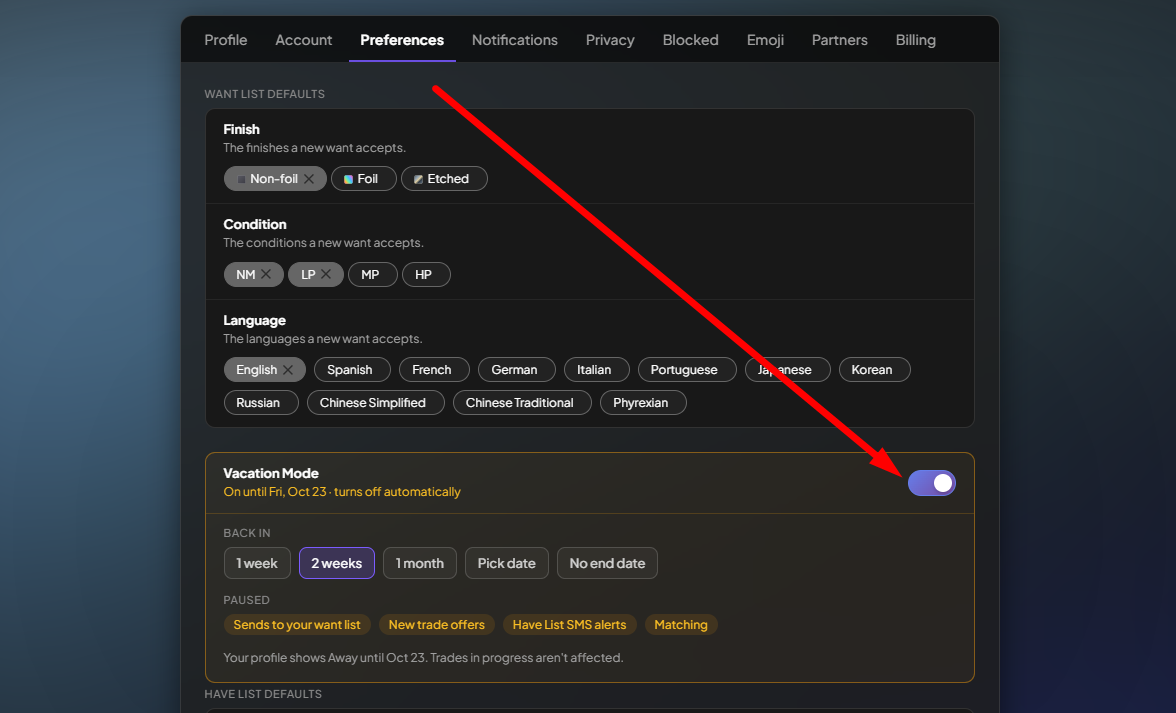
Choose when you're back: 1 week, 2 weeks, 1 month, a specific date up to 90 days away, or No end date. It starts on 2 weeks.
The card turns amber and lists exactly what's paused, so you can check before you close the page.
What you'll see while it's on
A banner appears at the top of every page while you're signed in: "Vacation Mode is on until" your return date, with a reminder that new sends, trade offers, and SMS alerts are paused. It can't be dismissed, which is deliberate. The worst outcome is forgetting you turned it on and wondering why nobody has sent you anything in a month.
Other traders see one thing: an "Away until" pill with your return date on your profile. If you chose No end date, it just says Away.

Coming back
If you picked a date, Vacation Mode turns off on its own on your return date. It switches off at midnight UTC at the start of that day, which in the US is the evening before, so you'll be back in Send Cards results by the time you're home. It doesn't send an email when it turns off.
To come back early, or if you chose No end date, click "I'm back" on the banner. Your wants reappear for senders, offers and SMS alerts resume, and you're back in matching straight away. Your want list, have list, and settings are exactly as you left them.
If you've got a trip coming up, or a list you want to get right before anyone can send to it, you'll find Vacation Mode on the Preferences tab in Settings.
Keep reading
- A Rebuilt Landing Page, Rarity Filters & Play Decklists
The logged-out landing page gets live data and interactive demos, every card list gains a rarity filter, and TradeMagic Play adds decklists, Safe to Draw, and tools built for big events. - Sustainable Economics Pt. 3: Year One
TradeMagic just turned one! Here's the year in four charts & where the economy stands - How It Works: Collection Focus Mode
One click collapses everything on My Cards except the search and your list, then makes the cards big.