Trade Directly from User Profiles + Leaderboard Launch
Two new features that work hand-in-hand to help you discover and trade with active community members
We just shipped two features that make discovering and trading with other members easier than ever: trading directly from user profiles and a community leaderboard.
These features complement each other beautifully. The leaderboard helps you find active, reputable traders in the community, and the profile trading feature lets you initiate trades with them directly—no need to navigate elsewhere.
Let's break down how each works.
Trade from User Profiles
You can now build and send trade packages directly from any user's profile page. No more jumping back to SendCards to initiate a trade—everything happens right from the profile.
Here's How It Works
Step 1: Visit a Profile
Click on any username anywhere on the site—in the activity feed, on the leaderboard, in your completed trades, wherever you see a clickable username.
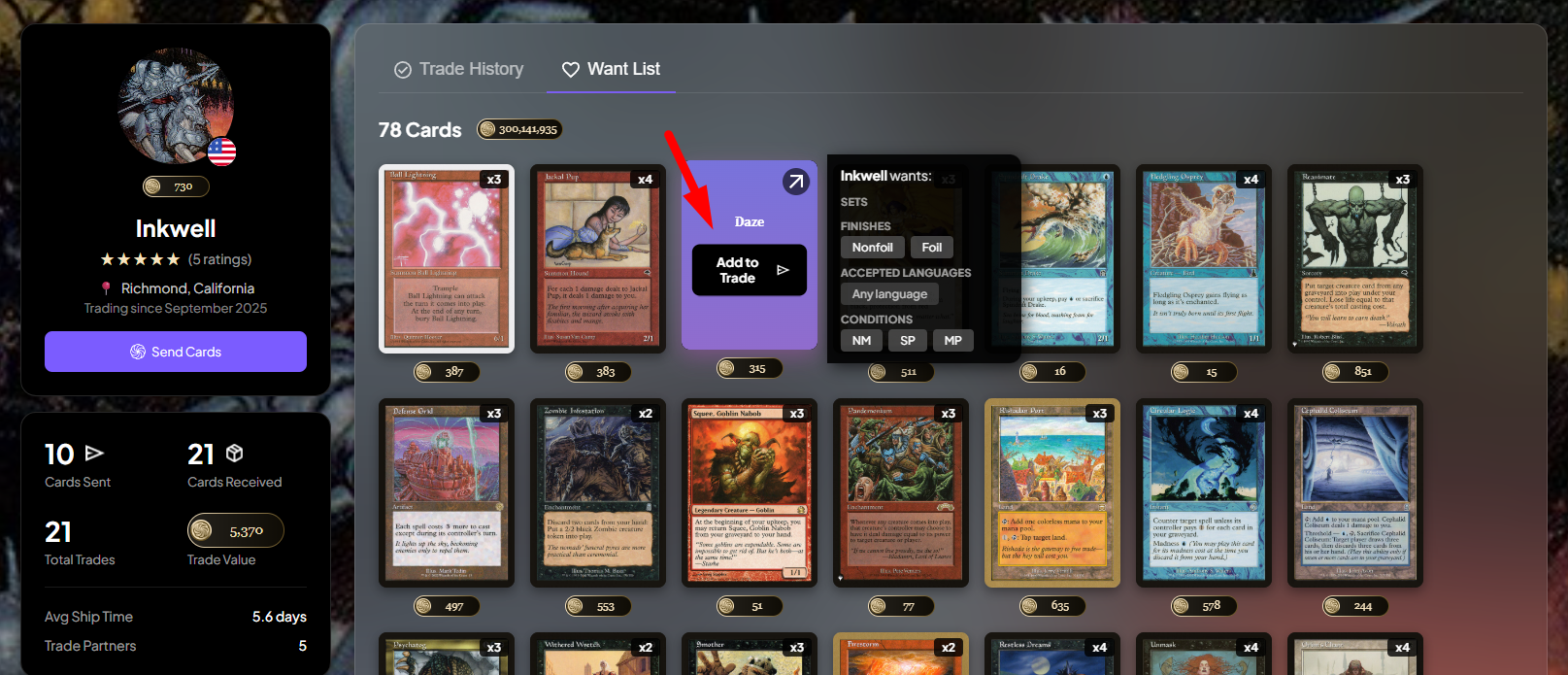
Step 2: Browse Their Want List
Open the Want List tab to see what cards they're looking for. You'll see their entire Want List with card images, set information, and point values.
Step 3: Add Cards to Your Trade
Hover over any card they want and click the "Add to Trade" button that appears. A sidebar opens on the right showing your trade package.
Step 4: Customize Each Card
For each card you've added:
Select the set/edition
Choose foil or non-foil
Pick the condition (Near Mint, Lightly Played, etc.)
Select language (English, Japanese, etc.)
The point value updates automatically based on your selections.
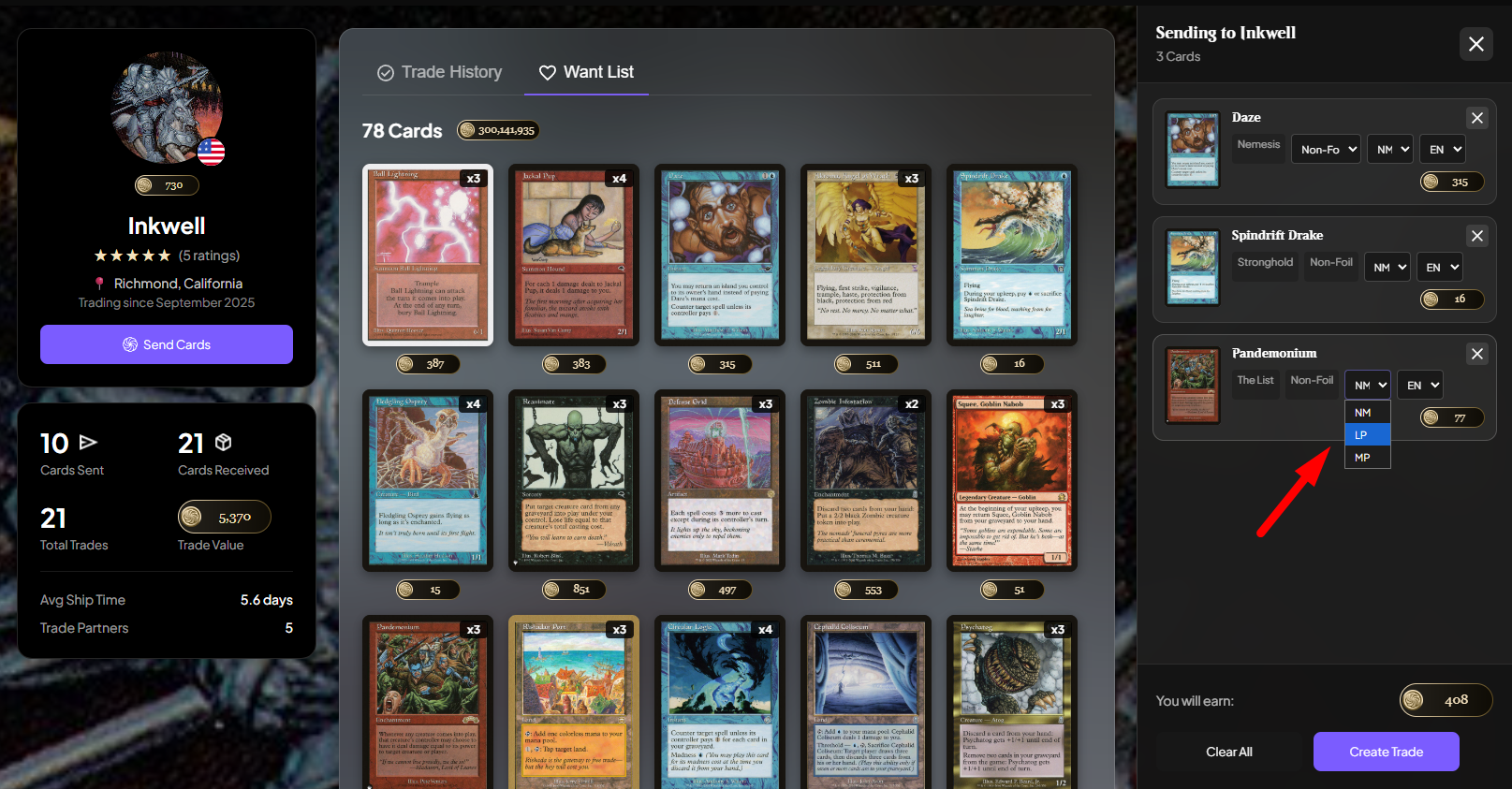
Step 5: Create the Trade
When your package is complete, click "Create Trade". The trade appears on your Sending page just like normal, and the recipient will see it on their Receiving page.
That's it. You never had to leave the profile.
Why This Is Useful
You already know who you want to trade with. Maybe you saw them on the activity feed, they have a great rating, or you've traded with them before. Now you can go straight to their profile, see exactly what they want, and start sending.
It's faster for targeted trading. If you're browsing member-by-member rather than card-by-card, this workflow is much more intuitive. Find a trader, check their Want List, send them cards—all in one place.
It pairs perfectly with the leaderboard (more on that next).
Leaderboard
We also launched a Leaderboard to help you discover the most active traders in the community.
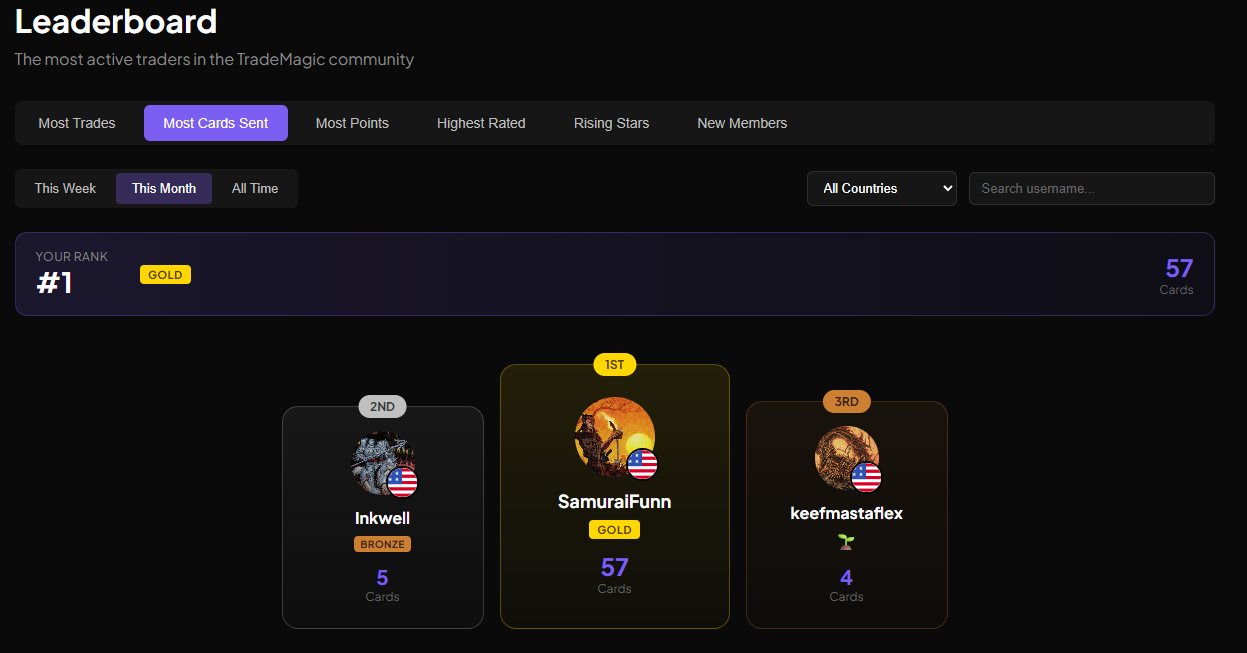
What the Leaderboard Shows
The leaderboard ranks members by several metrics:
Most Trades – Who's completed the most trades
Most Cards Sent – Who's shipping the most volume
Most Points – Who has the highest point balance
Highest Rated – Who has the best star ratings
Rising Stars – New members making waves
New Members – Recent signups
You can filter by:
Time period – This week, this month, or all time
Country – See top traders in your region or globally
Tier Badges
Each trader on the leaderboard has a tier badge based on their all-time completed trades:
🌱 Seedling – 0-9 trades
🥉 Bronze – 10-49 trades
🥈 Silver – 50-99 trades
🥇 Gold – 100-249 trades
💎 Diamond – 250+ trades
If you're logged in, you'll see your own rank highlighted along with how many trades you need to reach the next tier.
Where to Find It
What's the URL for the leaderboard page? I should hotlink it here but I don't know the URL.
How These Features Work Together
Here's the natural workflow:
Visit the Leaderboard to find active, highly-rated traders
Click on their username to view their profile
Browse their Want List to see what they need
Build and send a package directly from their profile
This is perfect for traders who prefer to go member-by-member rather than using SendCards to search card-by-card. You're browsing people, not inventory.
Example use case: You notice someone on the "Most Cards Sent" leaderboard with a great rating. You click their profile, see they want 15 cards from a set you have duplicates of, and send them a package—all without leaving their profile. Fast, targeted, efficient.
Coming Soon
We're already working on enhancements to profile trading:
Advanced Filtering
Only show cards this user can afford based on their point balance
Filter by set, color, card type, etc.
Advanced Sorting
Sort Want Lists by card value (high to low)
Sort by set or alphabetically by name
Sort by how recently they added cards
These features will make it even easier to find the best trades when browsing profiles.
Thank You
Special thanks to Portlis for the feedback and feature suggestions that inspired both of these features. The idea of browsing a list of members and sending packages directly from their profiles came from community input, and we're thrilled to bring it to life.
Keep the suggestions coming! You can submit feedback anytime using the Feedback button in the sidebar.
Get Started
Ready to try it out?
Check out the Leaderboard to discover active traders
Visit any user profile and browse their Want List
Hover over a card they want and click "Add to Trade"
Build your package and hit "Create Trade"
Happy trading! 🎴
Create a free account • Follow us: Twitter • Bluesky • Reddit • More articles
Keep reading
- Sustainable Economics Pt. 3: Year One
TradeMagic just turned one! Here's the year in four charts & where the economy stands - How It Works: Collection Focus Mode
One click collapses everything on My Cards except the search and your list, then makes the cards big. - What's New: Focus Mode, Trade Offer Revisions, and Sidebar Mode on /sendcards
Focus