Points have always been the ceiling on what you can receive. When you request a card, the points come out of your balance the moment the trade is initiated, so a 1,000 point balance means you could receive a $10 card max. The cards you own and the cards you can receive were two separate systems that were basically independent of one another.
Trade Builder connects them. You put cards on both sides of a deal, and the cards you are sending count toward what you can afford to receive. Your collection becomes collateral.
Here is what that looks like with real numbers. Say you have 0 points and you spot someone holding a Fork you want worth 3,000 points. Under the old rules that card is out of reach. But if they want a Verdant Catacombs sitting in your binder worth 4,000 points, you can offer to send it. Their card is worth 3,000 points and yours is worth 4,000, so the gap between the two sides is only 1,000 points, which can be covered by the card you send. You ship first, their side pays you 4,000 points when your card lands, and those points immediately fund the Fork coming back to you.
We pulled the numbers before building this. There are 4,199 pairs of traders on the platform where each person holds at least one card the other wants. In 2,610 of those pairs, both people are under 500 points. Thousands of trades that both sides wanted were sitting there unable to happen, purely because neither had the points to open a one-directional request.
Who ships first, and why
Every trade offer is two ordinary sends. Escrow is funded by whoever is receiving, at the moment their leg opens, which is the same rule that has always governed sends. What Trade Builder adds is that the two legs can be sequenced so one pays for the other.
Which order they run in depends on what the two balances can cover.
Situation 1: Both of you can fund your side. Both legs open at once. You each ship, you each receive, and neither of you waits on the other. This is the simplest case and it happens whenever both balances are healthy relative to what is coming at them.

Situation 2: Only one of you can fund. The person who can afford it receives first, which means the other person ships first. When that first package arrives and gets checked in, the points are credited to the shipper and immediately go into escrow for the second leg, which opens automatically. Nobody has to come back and do anything.

Situation 3: Neither of you can fund. The offer cannot be accepted yet, and you will see a message naming both shortfalls. It stays open rather than dying, so if either of you tops up before it expires, it becomes acceptable. The message tells you which of the two shortfalls is smaller, since that is the faster path to unlocking the trade.

The rule underneath all three is that at least one leg is always fully funded. Nobody goes into debt, no leg opens on credit, and the points backing every card in transit exist somewhere the whole time.
There is a corollary worth knowing when you are building an offer. Whoever moves first has to cover the full value of the cards arriving to them, and gets all of it back as the other side lands. Whoever goes second only needs the difference between the two sides, because the first leg has already paid them. That asymmetry is why a trade can be possible in one order and impossible in the other.
If you try to add a card and the builder stops you, you will see a note like "1 card isn't covered, you're 5,030 short." Points cover the most valuable cards first, so a shortfall always falls on the smallest card in the offer. Removing that one card is usually enough to make the rest of the deal work.
Three ways to start an offer
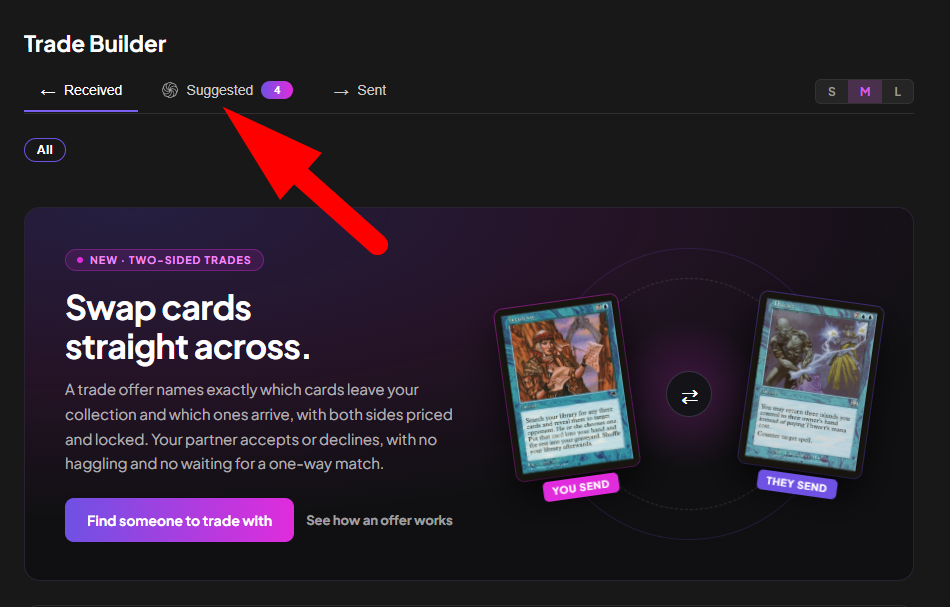
From the Suggested tab. We look for pairs of traders who each hold something the other wants and build a balanced package for both sides. Those show up under Suggested on the Trade Offers page. Take one and it seeds the builder with every card in the bundle, which you can then edit before sending.
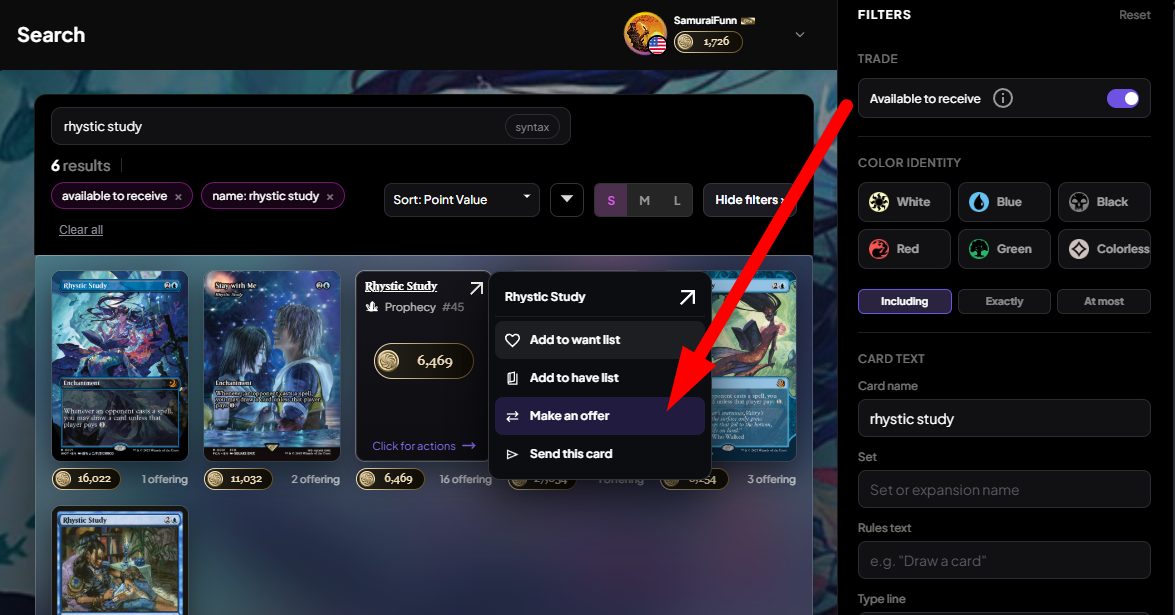
From search. Turn on the Available to receive filter under Trade in the filter panel, and search will only show you cards someone is actually holding and offering. Click a card you want, click Make an Offer, and if more than one person holds it you will get a picker showing each holder side by side: what condition their copy is in, how many trades they have completed, whether they have been active recently, and how many points they are sitting on. That last column matters more than it looks, because a holder's balance is what determines whether they can fund their leg and therefore whether the two of you can ship at the same time. You can sort the list by best condition, most trades, or most points. Picking someone opens a builder; it does not send anything.
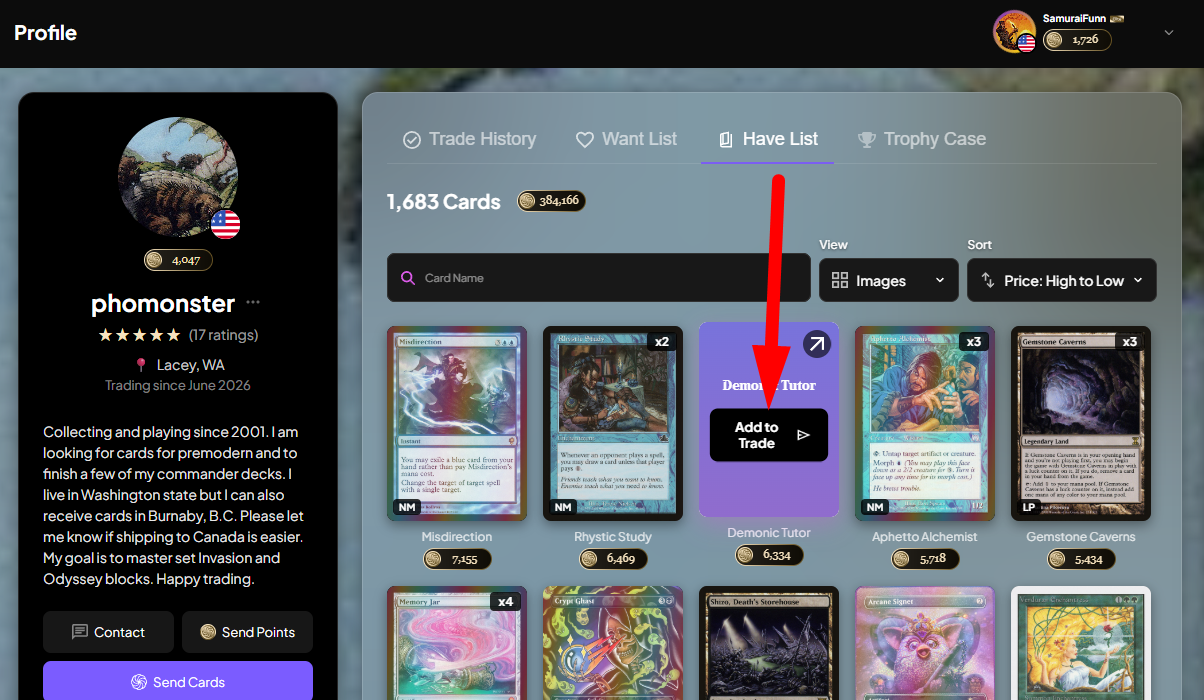
From a profile. Go to any trader's profile, open their Have List tab, hover a card and click Add to Trade. Some traders keep their have list private, so this route will not be available for everyone.
Building the offer
The builder opens on the overlap between the two of you: cards they want that you own on one side, cards they own that you want on the other. That auto-match is the default because it is almost always where the deal is.
If your lists are thin, or you have not imported a collection yet, the auto-match may not find much. Use the Full want list and Full have list toggles to browse everything instead of just the intersection. The full-collection view depends on that trader having made their have list public, so it will not be there for everyone.
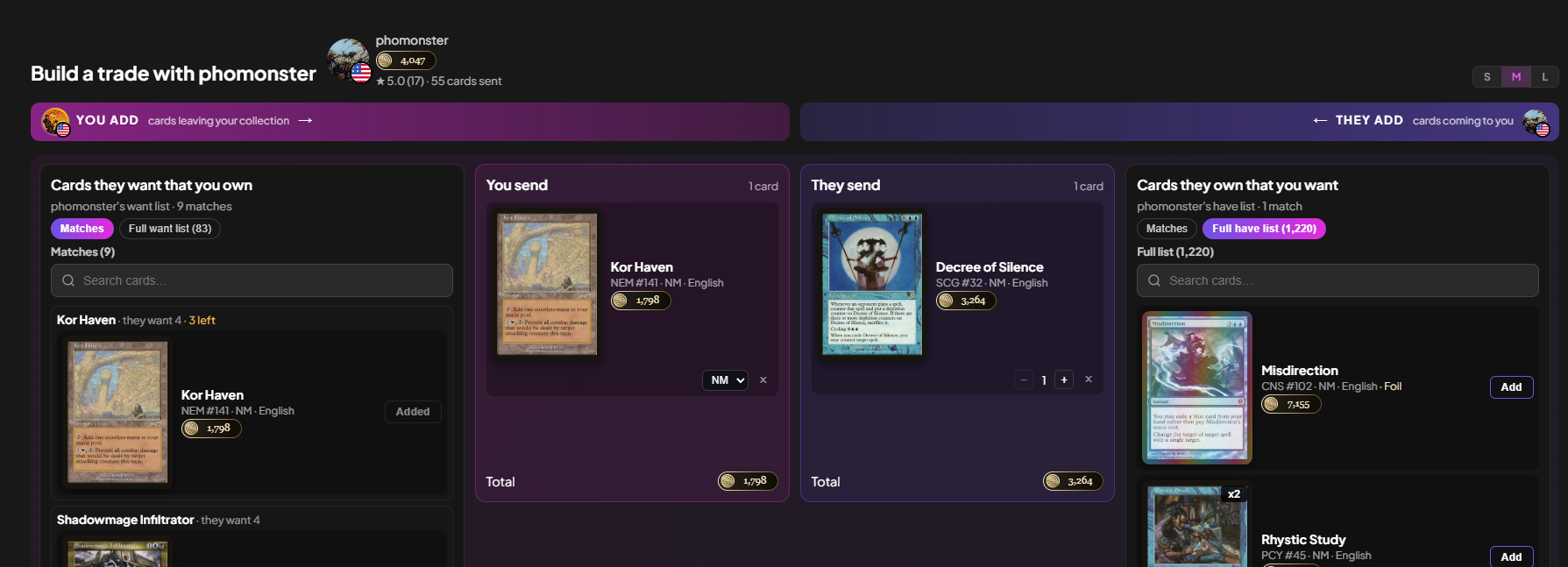
You can change the condition on cards you are sending, within what the other person's want list actually accepts. If they said near mint only, played copies will not be selectable.
Prices lock when you propose. Every card's point value is fixed at that moment and is never re-read for the life of the offer. Whatever the market does between your offer and their acceptance, what you agreed to is what settles.
What happens after you send
The offer lands with your trading partner as a notification and an email, and sits in their incoming list for seven days.
If they accept, the legs open according to the funding rules above and the trades appear on Sending and Receiving exactly like any other trade.
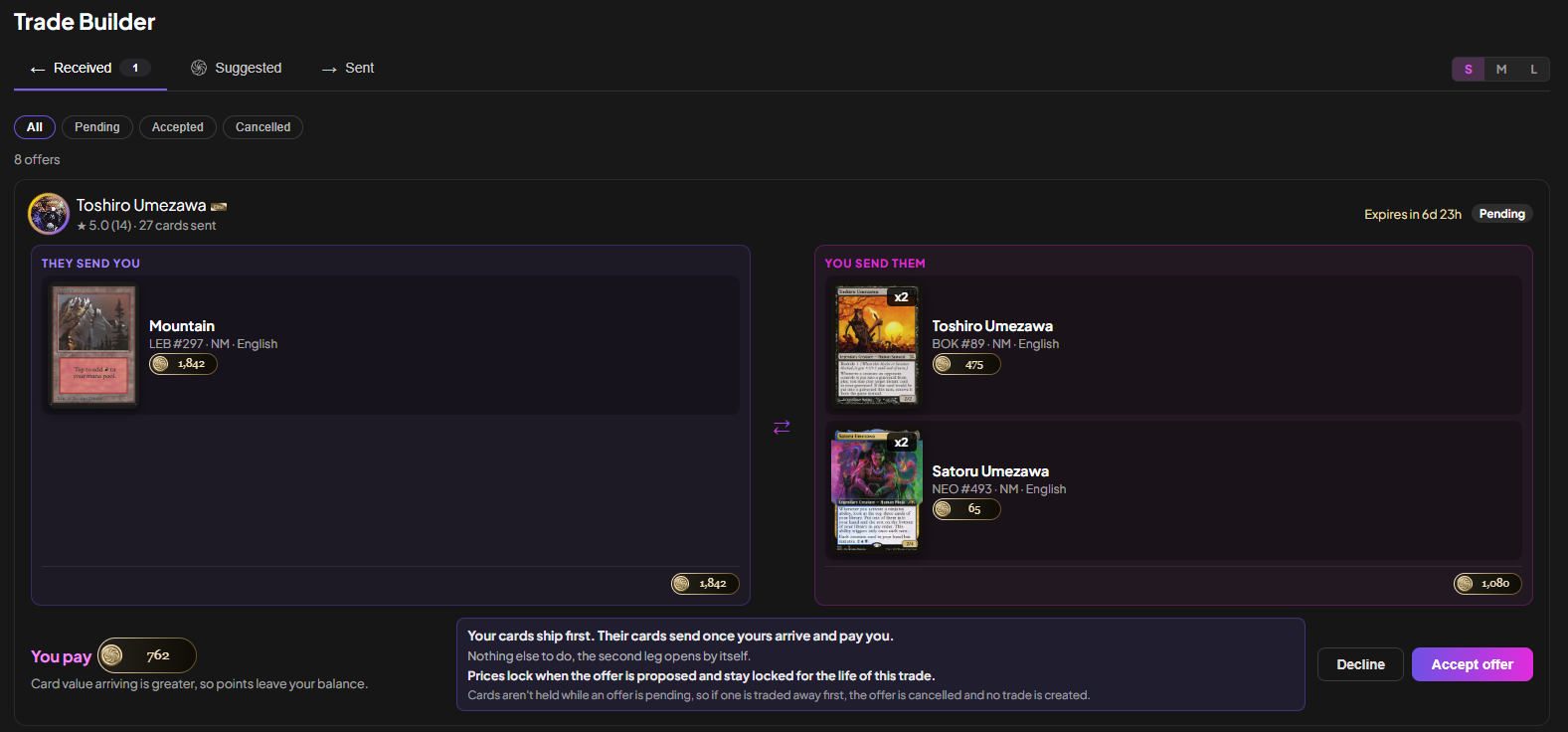
If they decline, that is the end of that offer. There are no counter-offers yet, so a decline means building a new offer rather than negotiating on the existing one. You can also cancel your own offer at any point while it is still pending.
If they ignore it, it expires after seven days and you both get told.
One case worth understanding: cards in a pending offer are not reserved. They stay on your have list and can still be sent through a normal request while the offer sits there. If a card in the offer gets sent away before your partner accepts, accepting will fail and name the specific card that went missing. No trade is created and nothing is silently re-priced around the gap. This is deliberate. Quietly dropping a card and re-calculating the rest after you locked a price is the exact behavior this feature exists to make impossible.
A sequenced trade, start to finish
Here is the full path for the case where one of you ships first.
You build the offer, choosing cards on both sides.
You propose it. Your partner gets a notification and an email.
They review it and either accept or decline.
On acceptance, funding is checked. Their balance covers their side, yours does not cover yours, so their leg opens first and you ship first.
Your leg appears on Sending and behaves like any other send. You pack it, ship it, mark it sent.
It arrives and they check it in by completing the trade. If something is wrong with what arrived, they open a case instead, and case resolution works exactly the way it always has.
Points are credited to you on completion, and immediately allocated to the second leg rather than landing in your spendable balance.
Those points fund the escrow for the card coming to you, and the second leg opens on its own.
It appears on Receiving as a normal incoming trade.
It arrives and you check it in the same way you would any other card.
From step five onward, everything behaves like the sends you already know. The sequencing is the only new machinery, and it runs itself.
Before you start
Four things determine whether Trade Builder can see your collection at all.
Your have list needs to be public for other traders to browse your full collection from your profile. Without it, they can still see the overlap between your lists, but they cannot go looking.

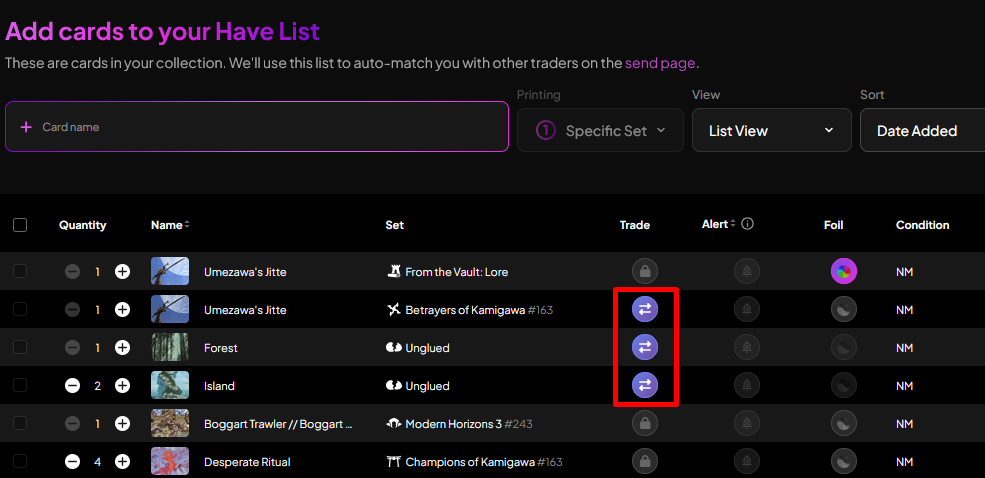
Cards need to be marked for trade. Trade Builder only ever looks at cards you have flagged as "for trade", so anything unmarked is invisible to it regardless of your privacy settings.
Your want list is what constrains incoming offers. The more accurate it is about condition, language, and finish, the better the offers you receive will be.
And if you would rather not receive offers at all, there is a toggle in Settings under Privacy that takes you out of offer discovery entirely, without touching a single card. Turning it off also means you cannot send offers, which keeps it even in both directions.
This one is in beta
Trade Builder is the most complicated thing we have built. Two trades, sequenced escrow, locked prices, and a funding calculation that has to be right every time. We have tested it hard, and we would still rather hear about a rough edge from you than find it ourselves in a month.
If something reads wrong, behaves unexpectedly, or just feels clunky, tell us by clicking Feedback. We hope this feature unlocks a ton of trades for you. Keep us posted and let us know how it goes!
Happy Trading 🎴
Keep reading
- A Rebuilt Landing Page, Rarity Filters & Play Decklists
The logged-out landing page gets live data and interactive demos, every card list gains a rarity filter, and TradeMagic Play adds decklists, Safe to Draw, and tools built for big events. - Sustainable Economics Pt. 3: Year One
TradeMagic just turned one! Here's the year in four charts & where the economy stands - How It Works: Collection Focus Mode
One click collapses everything on My Cards except the search and your list, then makes the cards big.