Most trades on TradeMagic go off without a hitch. Cards get shipped, cards arrive, everyone's happy. But sometimes things go wrong: a package takes longer than expected, a card shows up in the wrong condition, or something gets genuinely lost in the mail. This guide walks you through exactly what to do when that happens.
TradeMagic Guide to Case Resolution:
Don't Worry (We have your back)
Be Kind (Assume positive Intent)
Communicate (Respond quickly and clearly)
Before we get into the steps, three things to keep in mind. First, don't worry, we have your back. The case resolution system exists precisely for these moments, and our admins have seen it all. Second, stay cool and be kind. The overwhelming majority of trade issues are honest mistakes or postal service hiccups, not bad actors. Assume positive intent. Third, the single best thing you can do to get a fast resolution is communicate: respond quickly to both your trading partner and the case resolution admins.
Step 1: Contact your trading partner
No matter what went wrong, the first move is always the same: reach out to your trading partner directly. From your Sending or Receiving page, open the trade in question and click the Contact button.
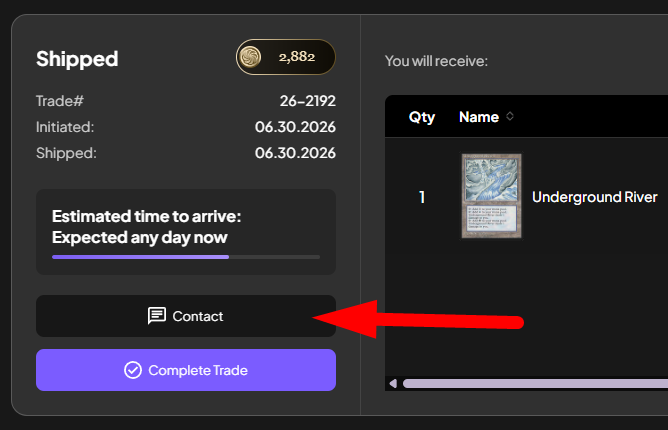
About 98% of issues get worked out this way. A polite message like "Hey, the package hasn't arrived yet, did you get a chance to ship it?" or "The card arrived but it's the wrong printing, can we figure this out?" resolves most problems without any admin involvement at all.
If your issue involves card condition or the wrong card arriving, photos are extremely helpful. You can paste images directly into the chat or click the image button in the message modal to upload one. Clear photos speed everything up, both for your partner and for any admin who reviews the case later.
Step 2: Summon an admin
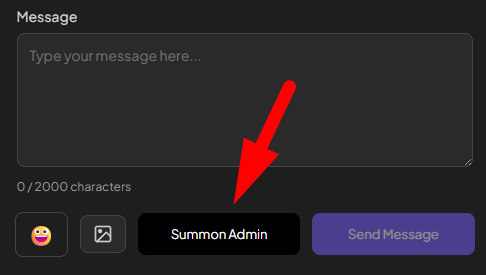
If direct communication doesn't resolve things, an admin is here to help. In that same contact modal, click the Summon Admin button and an admin will review your case. Either party in a trade can summon an admin, whether you're the sender or the receiver.
We do our best to respond to cases within 24 hours, though it can occasionally take a little longer on weekends or holidays.
Step 3: Work with the admin
Once summoned, a case resolution admin will review the full message history and trade details, and may ask clarifying questions. This is where responsiveness really matters: the faster you reply, the faster your case gets resolved.
One important note: if an admin doesn't hear back from a party within 72 hours, they may resolve the case with the information they've been given. Don't let silence decide your case for you.
How long should I wait before opening a case?
For domestic trades, most packages arrive within 7 to 14 days, but it's not uncommon for mail to take longer. If a package seems stuck, we generally like to wait 30 days before taking action. We've genuinely seen packages get unstuck and arrive 45 days later, but we don't like making people wait that long, so a resolution is typically issued around the 30 day mark.
For international trades, longer transit times are normal, and 45 days is about the maximum before we step in.
What can an admin actually do?
Case resolution admins have a full toolkit for making things right. A few of the most common resolutions:
Partial trade completion. If a package with many cards arrives but one of them has a problem, the admin can complete the trade for all the cards that arrived correctly and take independent action on the one that didn't. Sometimes that means the sender ships another copy of the card. Other times the trade for that card is completed at a fraction of its original value, such as when a card arrives in a lower condition or different language than listed.
Cancelling shipped trades. Admins can cancel trades that have already been marked as shipped. This is often the resolution when a card was never actually sent and therefore never arrived, returning the escrowed points to the receiver.
Neither party in the wrong. Sometimes things just get lost in the mail through no fault of anyone. In one memorable case, a mail truck literally caught on fire, and we tracked down the actual truck the card was in through local news stories. For situations like this, admins can resolve a case as "neither in the wrong": the trade is completed so the sender is credited points for sending, and the recipient is refunded since the card never arrived. This is one of the significant benefits of an asynchronous point-based trading economy, and it's part of what makes trading on TradeMagic so safe. From an economic standpoint, it's also one of the reasons we have a dynamic monthly point fee and transaction fee in place: to keep a healthy balance of points entering and exiting the ecosystem.
Naturally, admins pay close attention to patterns. Any user who develops a history of abusing the system will be flagged and potentially banned.
Resolving things yourselves with Send Points
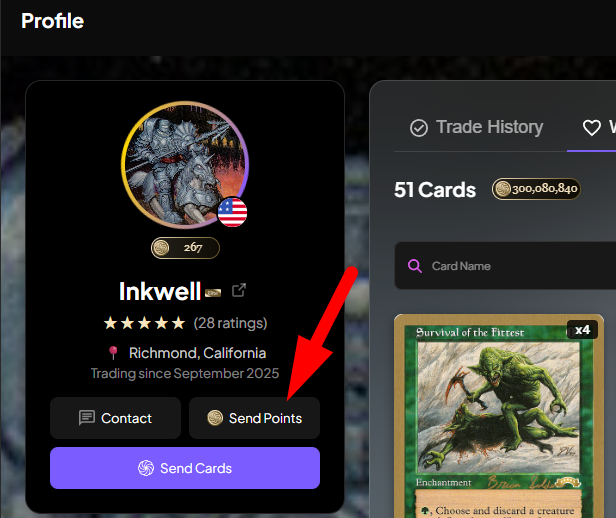
Here's a tool a lot of traders don't know about: everyone has access to a Send Points feature, available right from any trader's profile. If you and your partner come to an agreement on your own, say, a card arrived in slightly worse condition and you both agree a 50 point adjustment is fair, you can simply complete the trade and send the point adjustment directly. No admin needed. In disputes where the two of you can't agree, the admin will look at the photographs and facts of the case and make a decision.
Ratings keep the community healthy
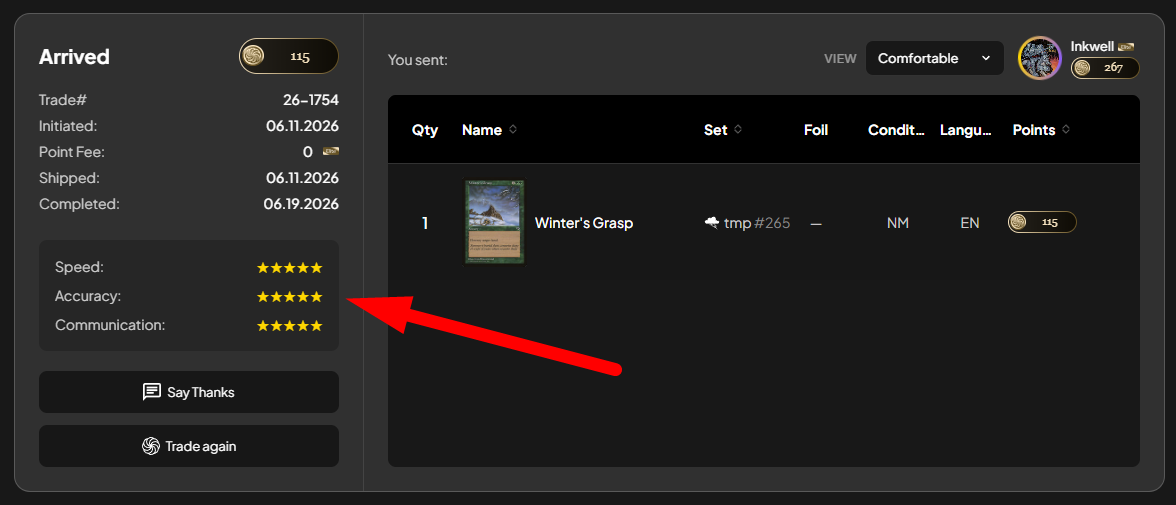
After every completed trade, both the sender and receiver can rate their trading partner on three criteria: speed, accuracy, and communication. The aggregate star rating is public on every trader's profile, but individual per-trade ratings are anonymous, so you can always rate honestly without worrying about awkwardness with a trading partner. These ratings are visible to the admin team and are one of the ways we keep the community safe and trustworthy.
Questions or feedback?
You can always reach us at support@trademagic.gg with any feedback, concerns, or questions. We're here to make sure every trade, even the ones that hit a bump, ends fairly.
Keep reading
- Sustainable Economics Pt. 3: Year One
TradeMagic just turned one! Here's the year in four charts & where the economy stands - How It Works: Collection Focus Mode
One click collapses everything on My Cards except the search and your list, then makes the cards big. - What's New: Focus Mode, Trade Offer Revisions, and Sidebar Mode on /sendcards
Focus
Stay Connected Follow TradeMagic for updates, tips, and community highlights:
Questions or feedback? We'd love to hear from you!