Switching from Cardsphere to TradeMagic? You can transfer your entire Magic: The Gathering collection in just a few minutes using our CSV import tool. No need to manually re-enter hundreds (or thousands) of cards.
This guide will show you how to export your collection from Cardsphere and import it directly into TradeMagic, whether you're moving your Have List, Want List, or both.
Why Import Your Collection?
If you've spent time building your collection on Cardsphere, starting over from scratch on a new trading platform sounds exhausting. The good news: TradeMagic's import tool lets you transfer your entire collection automatically.
Benefits of importing:
Save hours of manual data entry
Preserve your collection data including quantities and card details
Start trading immediately without rebuilding your lists
Works for both Have Lists and Want Lists using the same process
Before You Start
What you'll need:
Your Cardsphere account with an active Have List or Want List
A TradeMagic account (sign up free at trademagic.gg)
2-3 minutes for the import process
This process works identically for both Have Lists and Want Lists. For this tutorial, we'll focus on importing your Have List, but the steps are the same for your Want List.
Step 1: Export Your Collection from Cardsphere
First, you'll need to download your collection data from Cardsphere as a CSV file.
Navigate to your Have List on Cardsphere: https://www.cardsphere.com/haves
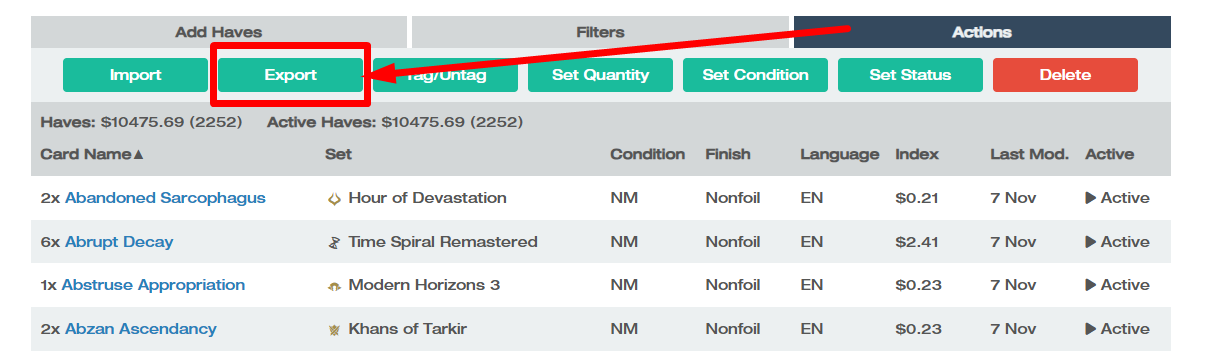
Click the "Export" button (usually found in the top right or menu)
Select "Export All Haves" from the dropdown options
Click "Download" to save the CSV file to your computer
Note: The file will download as a .csv file, typically named something like cardsphere_haves_export.csv
Step 2: Import Your Collection to TradeMagic
Now that you have your CSV file, it's time to bring it into TradeMagic.
Go to your Have List on TradeMagic: https://trademagic.gg/my-cards/have-list
Click the three-dot menu (
...) in the top right cornerSelect "Import" from the dropdown
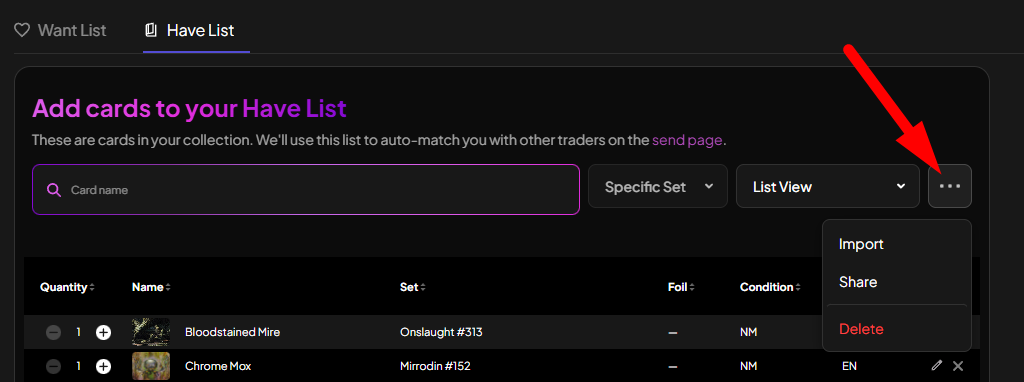
Choose "Upload CSV" as your Input Method
Drag and drop the Cardsphere export file into the drop zone (or click to browse)
Click "Import" to start the process
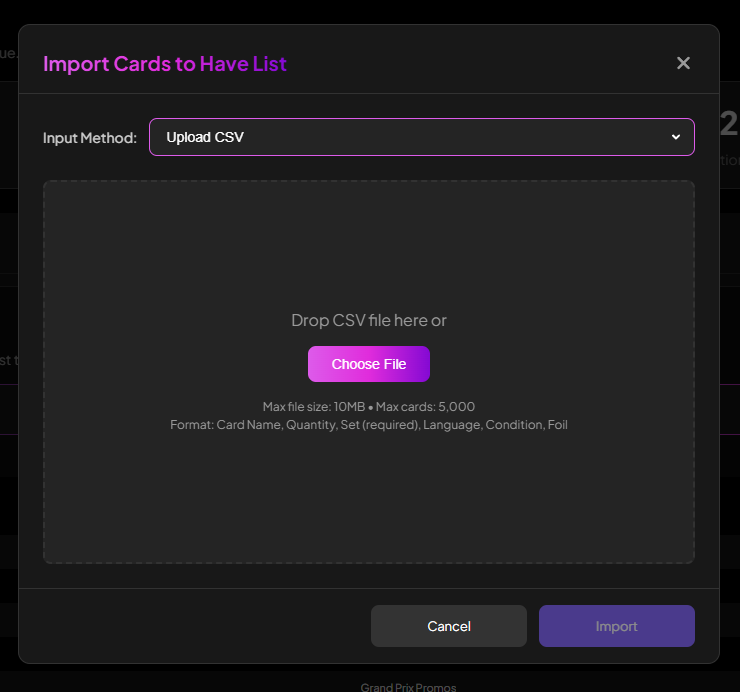
Processing time: Depending on your collection size, this may take 1-3 minutes. Don't close the browser window while importing.
Step 3: Verify Your Import
Once the import completes:
Review your Have List to confirm cards imported correctly
Check quantities to ensure they match your Cardsphere collection
Verify card editions and conditions if applicable
Pro tip: If you notice any discrepancies, you can always edit individual cards or delete the list and re-import if needed.
Importing Your Want List
Want to import your Want List too? Use the exact same process:
Export from Cardsphere: https://www.cardsphere.com/wants → Export → Export All Wants → Download
Import to TradeMagic: https://trademagic.gg/my-cards/want-list →
...→ Import → Upload CSVDone!
Troubleshooting Common Issues
Import taking too long?
Large collections (1000+ cards) may take 2-3 minutes. Be patient and don't refresh the page.
If it takes longer than 5 minutes, contact support at support@trademagic.gg
Cards not importing correctly?
Check your CSV format: Make sure you downloaded the file directly from Cardsphere without editing it
Verify file size: If your file is corrupted or incomplete, try exporting again from Cardsphere
Missing cards after import?
Some card editions may not be available yet on TradeMagic. We're constantly adding new sets.
Check the import log for any errors or skipped cards
Need to import multiple lists?
You can import both your Have List and Want List separately using the same process for each
Frequently Asked Questions
Q: Will this overwrite my existing TradeMagic collection?
A: No, imported cards are added to your existing collection. Duplicates are merged based on card name and edition.
Q: Can I import from other platforms besides Cardsphere?
A: Currently, TradeMagic supports CSV imports from Cardsphere, Deckbox, and other platforms that export standard CSV formats. More integrations coming soon.
Q: What data gets imported?
A: Card names, editions, quantities, and conditions (if included in the CSV). Pricing is automatically applied based on current market values.
Q: Can I undo an import?
A: Not automatically, but you can manually remove cards or contact support for help clearing your list.
Q: Is there a limit to how many cards I can import?
A: No limit! Import collections of any size, though larger collections take longer to process.
Ready to Start Trading?
Once you've imported your collection:
Review your Want List to make sure it's complete
Check the Send page to see if anyone wants cards you have
Start trading! TradeMagic makes it easy to find matches and ship cards
New to TradeMagic? Check out our How It Works guide to learn about asynchronous trading with Trade Credits.
Need Help?
If you run into issues importing your collection:
Email support: support@trademagic.gg
Check our Help Center: trademagic.gg/help
Join our Discord: Get help from other traders in our community
Happy trading! 🎴
Keep reading
- How to Build Community by Trading Cards
Unexpected and Delightful Throw-Ins - The Joy of Trading Cards Again
Why Trade Magic Is Bringing Back Magic's Best Kept Secret - Why Magic Players Need a Better Way to Trade
Why the magic trade market needs a purpose-built platform in 2026